
Recovery file
- Leitura
- 2 min
- Categoria
- Account and data recovery
A recovery file is a data recovery option. It lets you restore access to your encrypted data if you lose access to your account after resetting your password.
To fully secure your account against password loss, you should also enable at least one password reset method.
- How it works
- Download your recovery file
- Use your recovery file to restore encrypted data
- Disable your recovery file
How it works
A recovery file is an encrypted backup keychain stored in a file that you can download and save to your device. If you lose access to your account data after a password reset, you can restore it by uploading this file in your account settings.
You don’t need to open or read the file. Just download it and store it somewhere safe, accessible, and separately from your password.
Your recovery file unlocks your account data, but it can’t reset your password. Learn how Proton account recovery works
Download your recovery file
1. Sign in to account.proton.me and open your account settings.
2. Select Recovery from the sidebar.

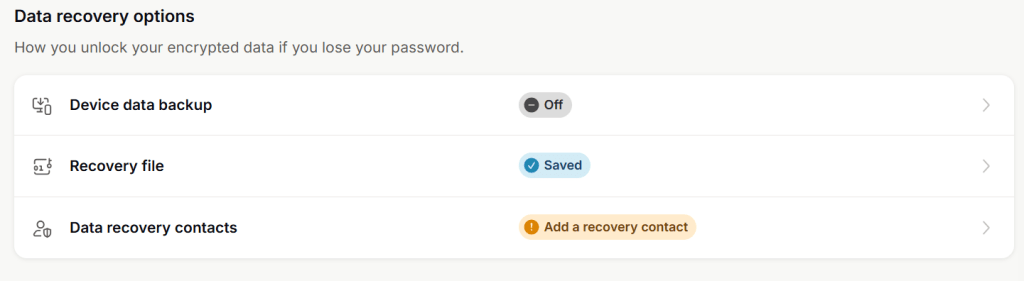
3. Scroll to Data recovery options and click Recovery file.

4. Click Download.

Your recovery file will be saved to your device. Store it somewhere safe, accessible, and separately from your password.
Use your recovery file to restore encrypted data
How to recover your account data using your recovery file
Disable your recovery file
1. Sign in to account.proton.me and open your account settings.
2. Select Recovery from the sidebar.
3. Scroll to Data recovery options and click Recovery file.
4. Click Void all recovery files.

5. Read the confirmation message. If you’re sure you want to continue, click Void.
Important note: Voiding your recovery files will also disable your trusted devices. You won’t be able to use keep me signed in or device data backup until you add new trusted devices.

Your recovery file has been voided and can no longer be used. Remember to re-add any trusted devices you want to use.